See how the main parts of Studio work together before you settle into a project.
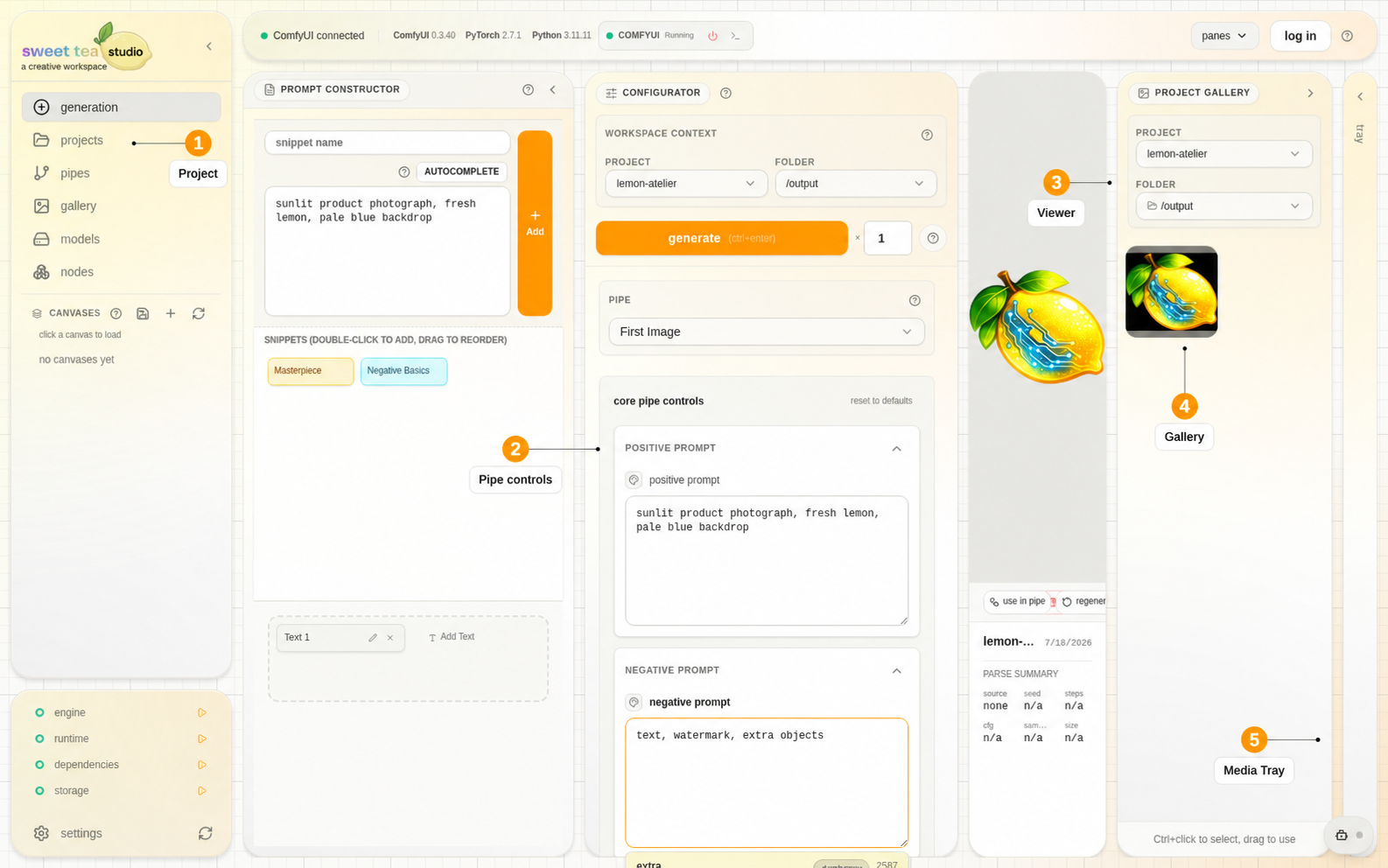
This is the one full-workspace view in the Docs. Feature pages use closer crops so the relevant controls stay legible.
The main pieces #
ComfyUI is the engine that executes a graph. Studio turns that workflow into a Pipe with clear controls, project folders, and a Gallery.
A Pipe is a reusable workflow-backed tool. Importing workflow JSON starts the conversion; the Pipe can run after Studio recognizes the graph, finds its final image or video, maps its controls, and sees the models and nodes it needs.
A project keeps its images, video, masks, and saved work together. Use folders for sources, explorations, masks, and finals.
Each click of Generate creates one run; a batch creates several. Generation Feed shows queued and active work. Gallery shows the images and video saved in your projects.
Saved work and nearby media #
A Canvas saves the current Prompt Studio workspace so you can return to the same Pipe, prompt, controls, and working images. The Parameter Palette keeps a few frequently changed controls nearby. Neither changes the Pipe itself.
The Media Tray keeps a few images or clips beside the workspace for comparison or drag-to-input reuse. Gallery remains the place to organize project files.
Local, account, and public access #
- Local Studio projects, Pipes, media, models, nodes, and Transform work without a web account.
- Supported settings sync and cloud Agent Access use an account because they connect installations or machines.
- Web Resources is the public catalog. Workflow Doc privately inspects a supported workflow file in the browser.
A practical mental model #
| Question | Look at |
|---|---|
| Can Studio reach the engine? | ComfyUI connection |
| Can this workflow become a usable tool? | Pipe validation and final output |
| Can this machine execute it? | Models and Nodes |
| Where will the image or clip be saved? | Project and folder |
| What happened to this generation? | Generation Feed, then Gallery |
| How do I resume or reuse it? | Canvas, viewer actions, Media Tray |