
Generate one image or run a batch, then follow each item in Generation Feed.
Make one image first. Increase the batch only after the Pipe and settings produce something worth comparing.
Generate starts the active Pipe with the visible project, folder, prompt, and settings. Batch accepts a value from 1 through 100 and repeats that setup as separate generations. Studio keeps Generate unavailable while a named workflow, model, node, field, or folder requirement is missing.
Run a batch #
- Generate one item and inspect it.
- Set a batch size that fits the cost and review time of the workflow.
- Start the batch.
- Watch the first few images or clips before leaving a long queue unattended.
- Cancel queued or running work when the first few show that the batch is not working.
Generation Feed is the movable activity panel for local and Agent Access generations. It shows previews, queued and running progress, completed images or clips, errors, and cancellation controls. After Studio saves the media, use Gallery for review and organization.
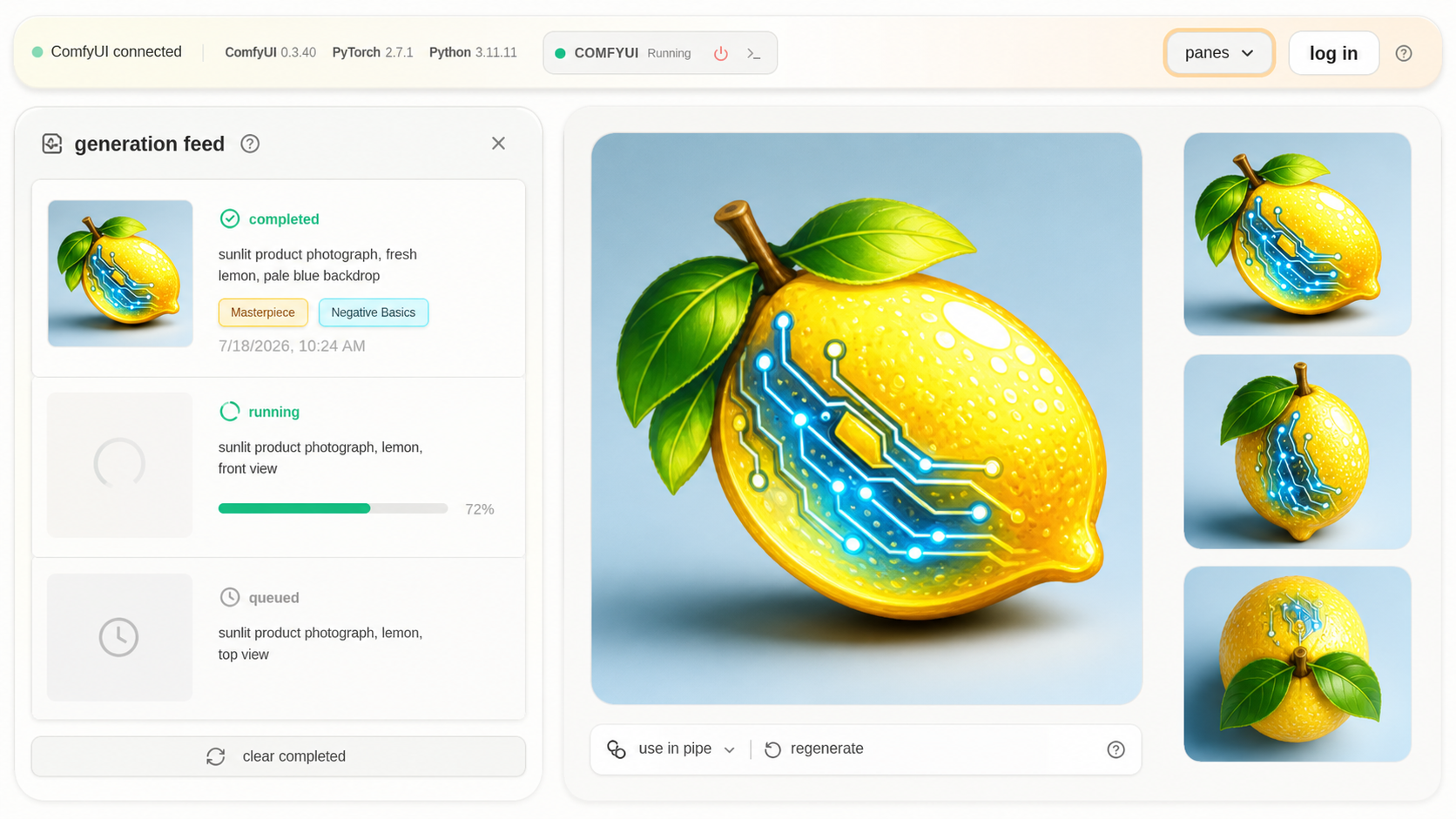
The Feed stays readable beside the work, with each image or clip showing its own progress.
Read each state #
| State | Meaning |
|---|---|
| Queued | Waiting for ComfyUI to start |
| Running | ComfyUI is working through the workflow |
| Completed | Studio finished and saved the image or clip |
| Failed | Studio or ComfyUI shows the exact error |
| Cancelled | Studio or ComfyUI stopped the generation |