
Manage the workflow-backed creative tools available to local Studio.
Before you start #
Connect ComfyUI so Studio can validate graphs and resolve runtime-backed fields. Fresh profiles include starter Pipes; imported and composed Pipes join the same library.
The Pipes library is the local home for Pipe cards, import and export, runtime revalidation, dependency status, archive, graph inspection, editing, and composition. A Pipe packages a supported ComfyUI graph with a creator-facing schema; readiness describes whether the connected engine can execute it.
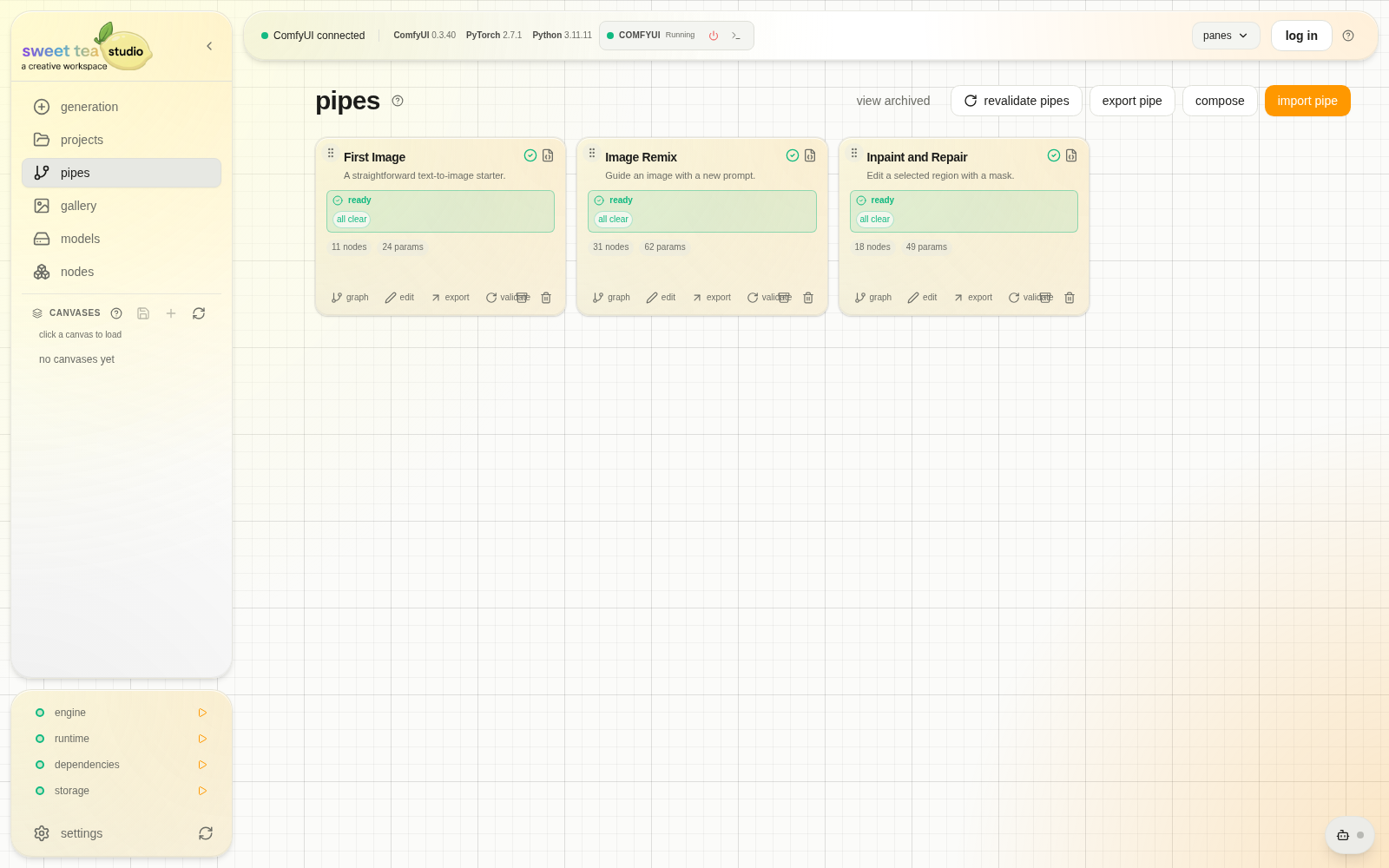
Each card represents one local workflow tool and its current readiness.
Work with a Pipe #
- Open a card to read its description and status.
- Revalidate after changing the connected engine, models, or nodes.
- Open the graph when you need to understand its output path.
- Edit the Pipe to improve labels, visibility, order, grouping, or bypass controls.
- Export a
.teapackage when the tool is ready to move or share. - Archive tools you want to retain without keeping in the active grid.
What each status covers #
| Status area | Answers |
|---|---|
| Graph validation | Can Studio normalize the workflow and identify one terminal output? |
| Dependencies | Which models or custom nodes are missing? |
| Schema | Can exposed controls map to valid graph inputs? |
| Runtime | Can the connected engine resolve choices and submit the graph? |