
Let an MCP-compatible agent inspect or work in selected Studio Projects while you control what it can see, what it can do, and which actions need approval.
Before you start #
Decide whether the client runs on the same computer or reaches Studio through cloud access. Choose which Projects it may see and what kinds of work it may prepare.
Agent Access manages connection packages, Project visibility, instructions, allowed actions, approvals, activity, tokens, and cloud runtimes. Each connection receives only the Projects and actions you grant to it.
Create a connection #
- Open Settings → Connections → Agent Access.
- Create or select a connection.
- Choose which Projects the connection can see.
- Select the actions it may use.
- Add stable instructions that should apply across requests, not a one-off request.
- Set the approval policy.
- Generate the connection package and add it to the client.
- Verify the connection in Agent Monitor.
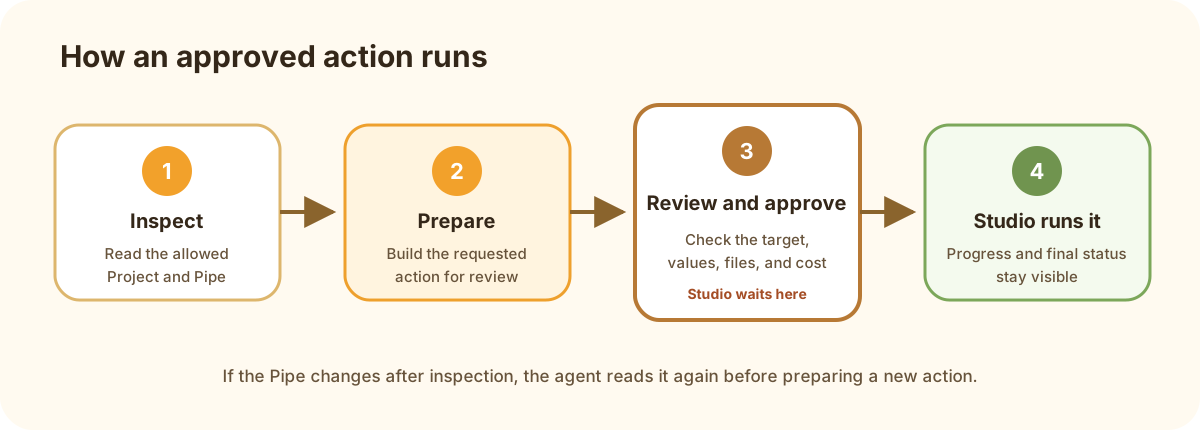
The agent prepares work inside the connection’s limits; Studio shows an approval before protected actions run.
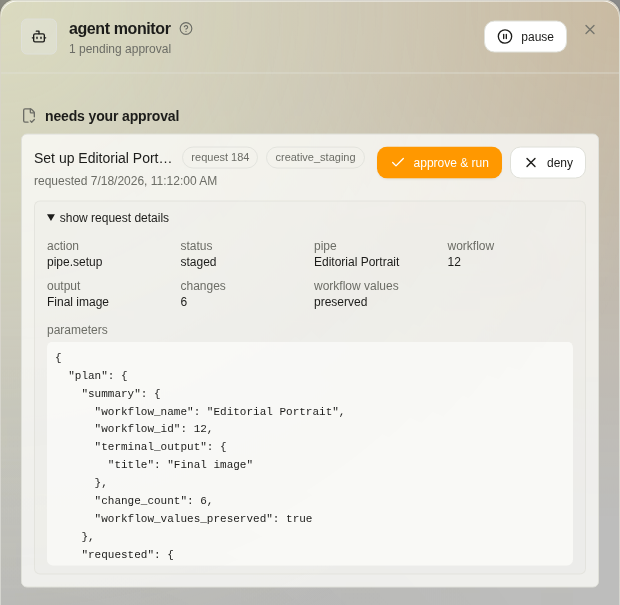
The approval shows the proposed action and its details before you choose Approve & run or Deny.
For agent-assisted Pipe setup, the agent inspects the Pipe and its dependencies before preparing pipe.setup. Studio validates the proposed setup, presents the approval, and waits. Approval applies it; the agent shows the approval and stops. Installing dependencies is a separate Build & configure permission.
Local and cloud access #
Same-computer access can use a local connector without a Web account. Cloud Agent Access needs an account and cloud runtime because the connection crosses machines. Both connection types keep Project visibility and approval choices explicit.