--- base_model: Qwen/Qwen-Image-2512 license: apache-2.0 language: - en - zh pipeline_tag: text-to-image tags: - gguf - quantized - unsloth - qwen widget: - text: cartoon sloth output: url: assets/unsloth_cartoon.png --- # Read our How to [Run Qwen-Image-2512 Guide!](https://unsloth.ai/docs/models/qwen-image-2512) 💜 This is a GGUF quantized version of [Qwen-Image-2512](https://huggingface.co/Qwen/Qwen-Image-2512). unsloth/Qwen-Image-2512-GGUF uses [Unsloth Dynamic 2.0](https://docs.unsloth.ai/basics/unsloth-dynamic-2.0-ggufs) methodology for SOTA performance. - Important layers are upcasted to higher precision. - To use the model, read our guides for [ComfyUI](https://unsloth.ai/docs/models/qwen-image-2512) or [stable-diffusion.cpp](https://unsloth.ai/docs/models/qwen-image-2512/stable-diffusion.cpp). - Uses tooling from [ComfyUI-GGUF](https://github.com/city96/ComfyUI-GGUF) by city96. ### Samples --- 💜 Qwen Chat | 🤗 Hugging Face | 🤖 ModelScope | 📑 Tech Report | 📑 Blog 🖥️ Demo | 💬 WeChat (微信) | 🫨 Discord | Github # Introduction We are excited to introduce Qwen-Image-2512, the December update of Qwen-Image’s text-to-image foundational model. You are welcome to try the latest model at [Qwen Chat](https://chat.qwen.ai/?inputFeature=image_edit). Compared to the base Qwen-Image model released in August, Qwen-Image-2512 features the following key improvements: * **Enhanced Huamn Realism** Qwen-Image-2512 significantly reduces the “AI-generated” look and substantially enhances overall image realism, especially for human subjects. * **Finer Natural Detail** Qwen-Image-2512 delivers notably more detailed rendering of landscapes, animal fur, and other natural elements. * **Improved Text Rendering** Qwen-Image-2512 improves the accuracy and quality of textual elements, achieving better layout and more faithful multimodal (text + image) composition. ## Model Performance We conducted over 10,000 rounds of blind model evaluations on [AI Arena](https://aiarena.alibaba-inc.com/corpora/arena/leaderboard?arenaType=T2I), and the results show that Qwen-Image-2512 is currently the strongest open-source model—while remaining highly competitive even among closed-source models. 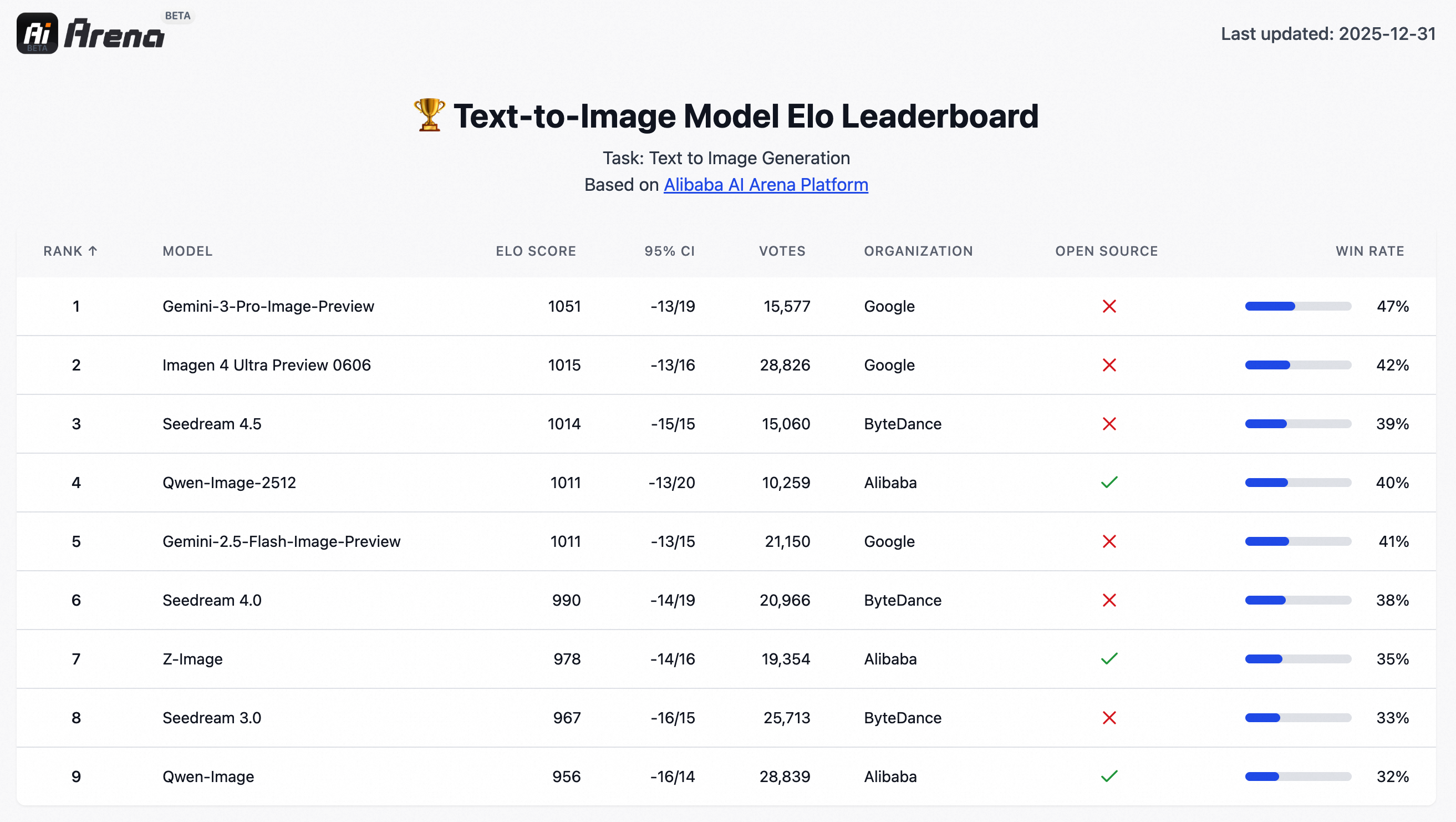 ## Quick Start Install the latest version of diffusers ``` pip install git+https://github.com/huggingface/diffusers ``` The following contains a code snippet illustrating how to use `Qwen-Image-2512`: ```python from diffusers import DiffusionPipeline import torch model_name = "Qwen/Qwen-Image-2512" # Load the pipeline if torch.cuda.is_available(): torch_dtype = torch.bfloat16 device = "cuda" else: torch_dtype = torch.float32 device = "cpu" pipe = DiffusionPipeline.from_pretrained(model_name, torch_dtype=torch_dtype).to(device) # Generate image prompt = '''A 20-year-old East Asian girl with delicate, charming features and large, bright brown eyes—expressive and lively, with a cheerful or subtly smiling expression. Her naturally wavy long hair is either loose or tied in twin ponytails. She has fair skin and light makeup accentuating her youthful freshness. She wears a modern, cute dress or relaxed outfit in bright, soft colors—lightweight fabric, minimalist cut. She stands indoors at an anime convention, surrounded by banners, posters, or stalls. Lighting is typical indoor illumination—no staged lighting—and the image resembles a casual iPhone snapshot: unpretentious composition, yet brimming with vivid, fresh, youthful charm.''' negative_prompt = "低分辨率,低画质,肢体畸形,手指畸形,画面过饱和,蜡像感,人脸无细节,过度光滑,画面具有AI感。构图混乱。文字模糊,扭曲。" # Generate with different aspect ratios aspect_ratios = { "1:1": (1328, 1328), "16:9": (1664, 928), "9:16": (928, 1664), "4:3": (1472, 1104), "3:4": (1104, 1472), "3:2": (1584, 1056), "2:3": (1056, 1584), } width, height = aspect_ratios["16:9"] image = pipe( prompt=prompt, negative_prompt=negative_prompt, width=width, height=height, num_inference_steps=50, true_cfg_scale=4.0, generator=torch.Generator(device="cuda").manual_seed(42) ).images[0] image.save("example.png") ``` ## Showcase **Enhanced Huamn Realism** In Qwen-Image-2512, human depiction has been substantially refined. Compared to the August release, Qwen-Image-2512 adds significantly richer facial details and better environmental context. For example: > A Chinese female college student, around 20 years old, with a very short haircut that conveys a gentle, artistic vibe. Her hair naturally falls to partially cover her cheeks, projecting a tomboyish yet charming demeanor. She has cool-toned fair skin and delicate features, with a slightly shy yet subtly confident expression—her mouth crooked in a playful, youthful smirk. She wears an off-shoulder top, revealing one shoulder, with a well-proportioned figure. The image is framed as a close-up selfie: she dominates the foreground, while the background clearly shows her dormitory—a neatly made bed with white linens on the top bunk, a tidy study desk with organized stationery, and wooden cabinets and drawers. The photo is captured on a smartphone under soft, even ambient lighting, with natural tones, high clarity, and a bright, lively atmosphere full of youthful, everyday energy. 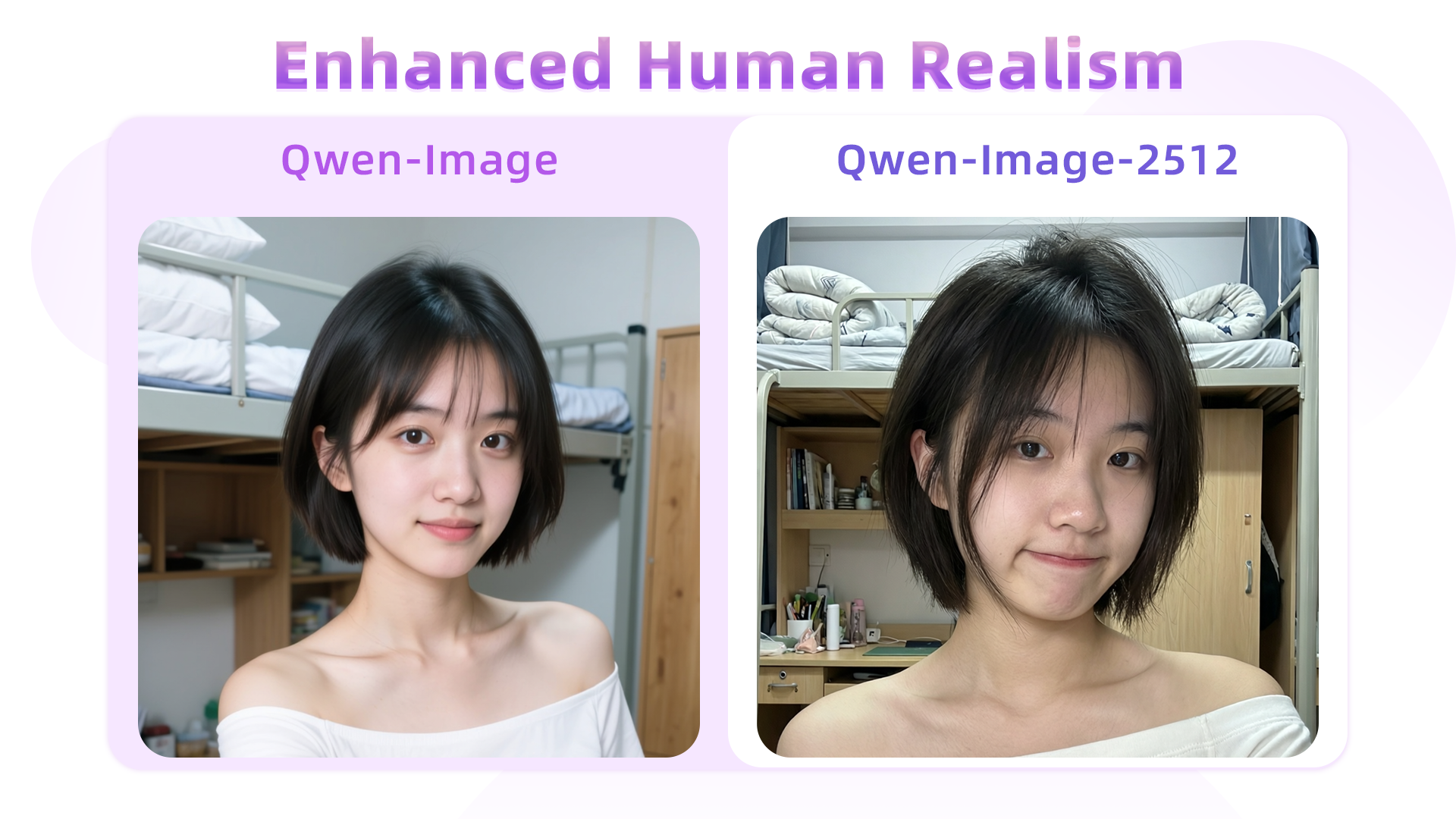 For the same prompt, Qwen-Image-2512 yields notably more lifelike facial features, and background objects—e.g., the desk, stationery, and bedding—are rendered with significantly greater clarity than in Qwen-Image. > A 20-year-old East Asian girl with delicate, charming features and large, bright brown eyes—expressive and lively, with a cheerful or subtly smiling expression. Her naturally wavy long hair is either loose or tied in twin ponytails. She has fair skin and light makeup accentuating her youthful freshness. She wears a modern, cute dress or relaxed outfit in bright, soft colors—lightweight fabric, minimalist cut. She stands indoors at an anime convention, surrounded by banners, posters, or stalls. Lighting is typical indoor illumination—no staged lighting—and the image resembles a casual iPhone snapshot: unpretentious composition, yet brimming with vivid, fresh, youthful charm. 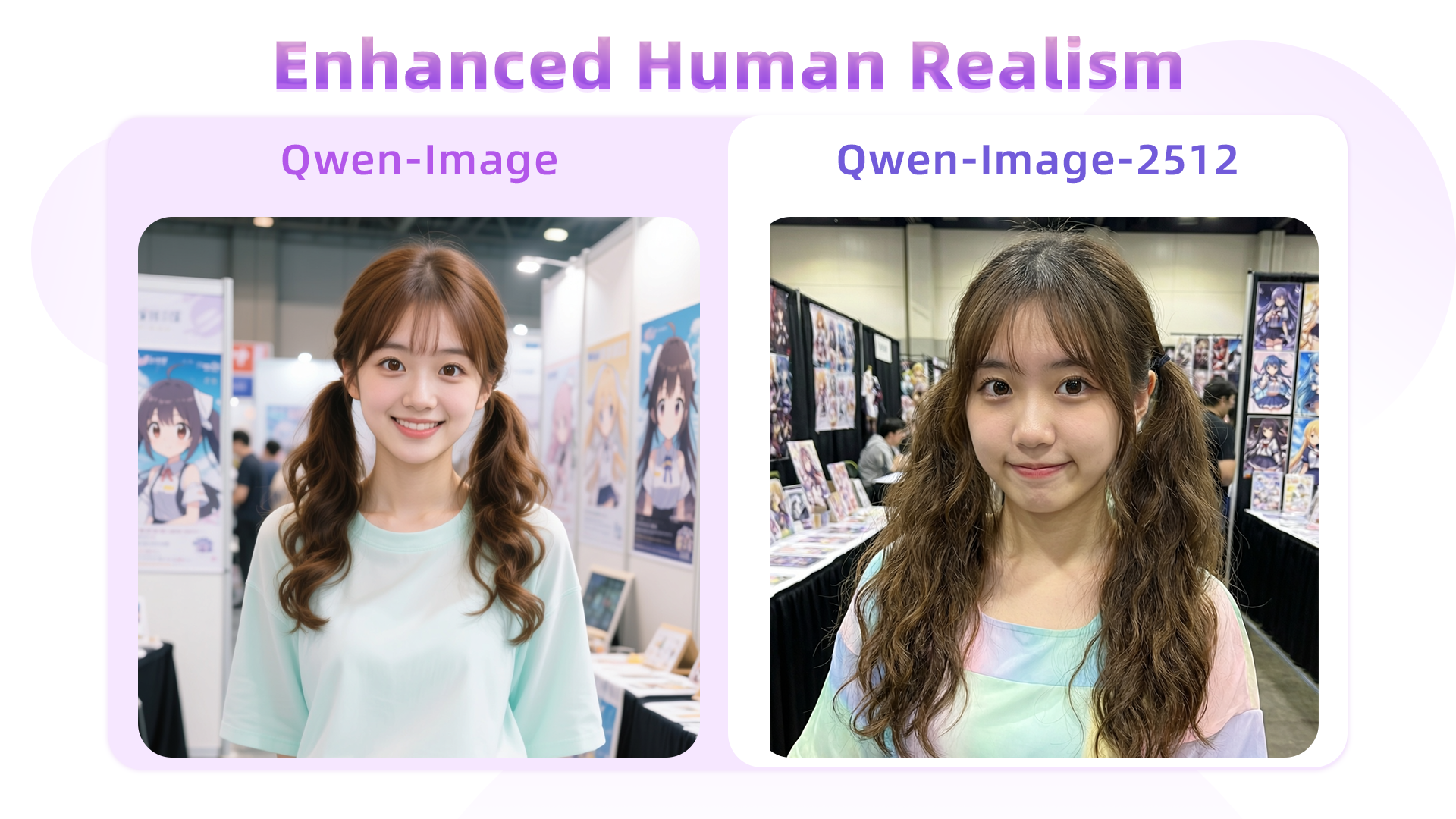 Here, hair strands serve as a key differentiator: Qwen-Image’s August version tends to blur them together, losing fine detail, whereas Qwen-Image-2512 renders individual strands with precision, resulting in a more natural and realistic appearance. Another case: > An East Asian teenage boy, aged 15–18, with soft, fluffy black short hair and refined facial contours. His large, warm brown eyes sparkle with energy. His fair skin and sunny, open smile convey an approachable, friendly demeanor—no makeup or blemishes. He wears a blue-and-white summer uniform shirt, slightly unbuttoned, made of thin breathable fabric, with black headphones hanging around his neck. His hands are in his pockets, body leaning slightly forward in a relaxed pose, as if engaged in conversation. Behind him lies a summer school playground: lush green grass and a red rubber track in the foreground, blurred school buildings in the distance, a clear blue sky with fluffy white clouds. The bright, airy lighting evokes a joyful, carefree adolescent atmosphere. 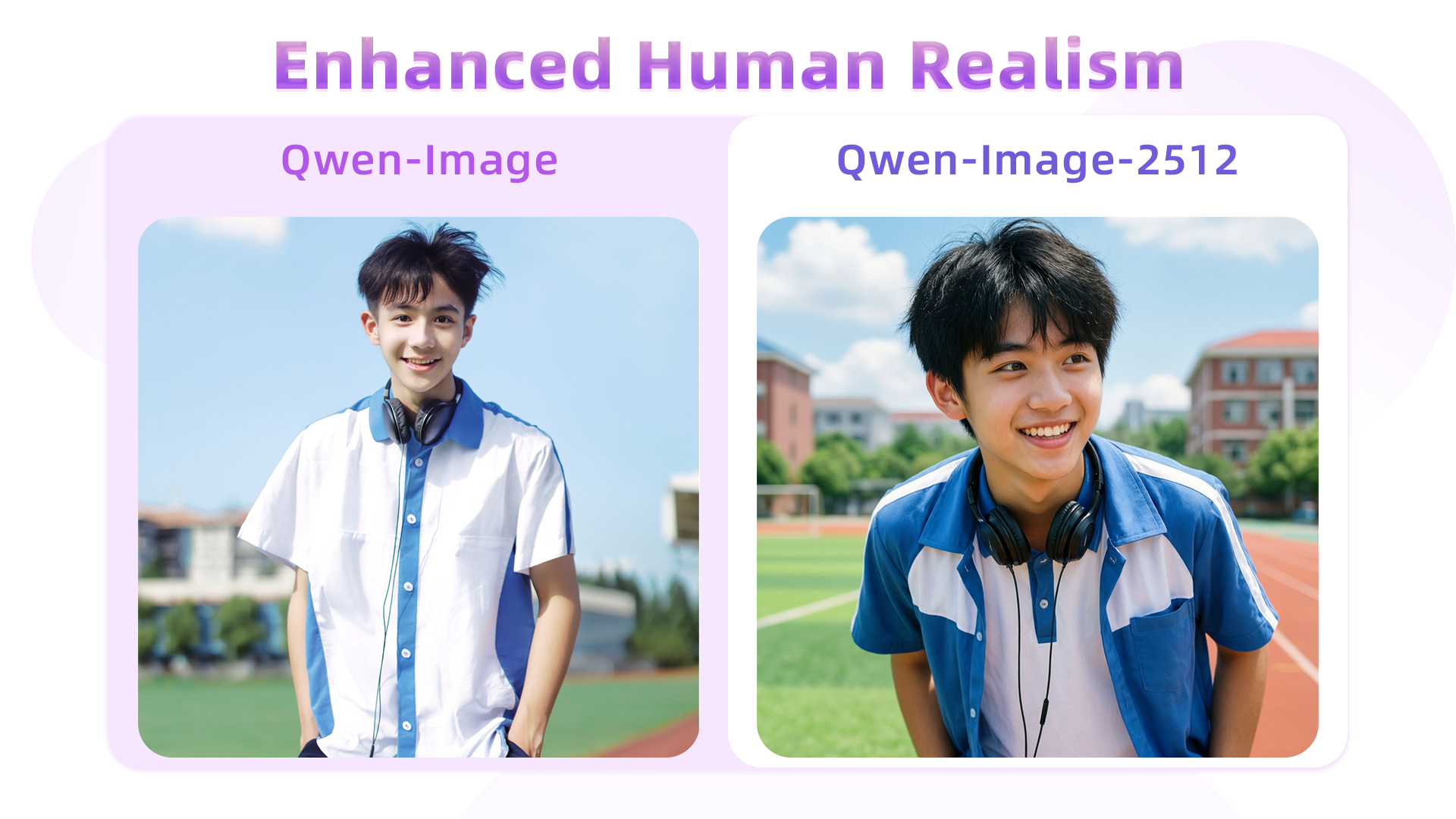 In this example, Qwen-Image-2512 better adheres to semantic instructions—for instance, the prompt specifies “body leaning slightly forward,” and Qwen-Image-2512 accurately captures this posture, unlike its predecessor. > An elderly Chinese couple in their 70s in a clean, organized home kitchen. The woman has a kind face and a warm smile, wearing a patterned apron; the man stands behind her, also smiling, as they both gaze at a steaming pot of buns on the stove. The kitchen is bright and tidy, exuding warmth and harmony. The scene is captured with a wide-angle lens to fully show the subjects and their surroundings. 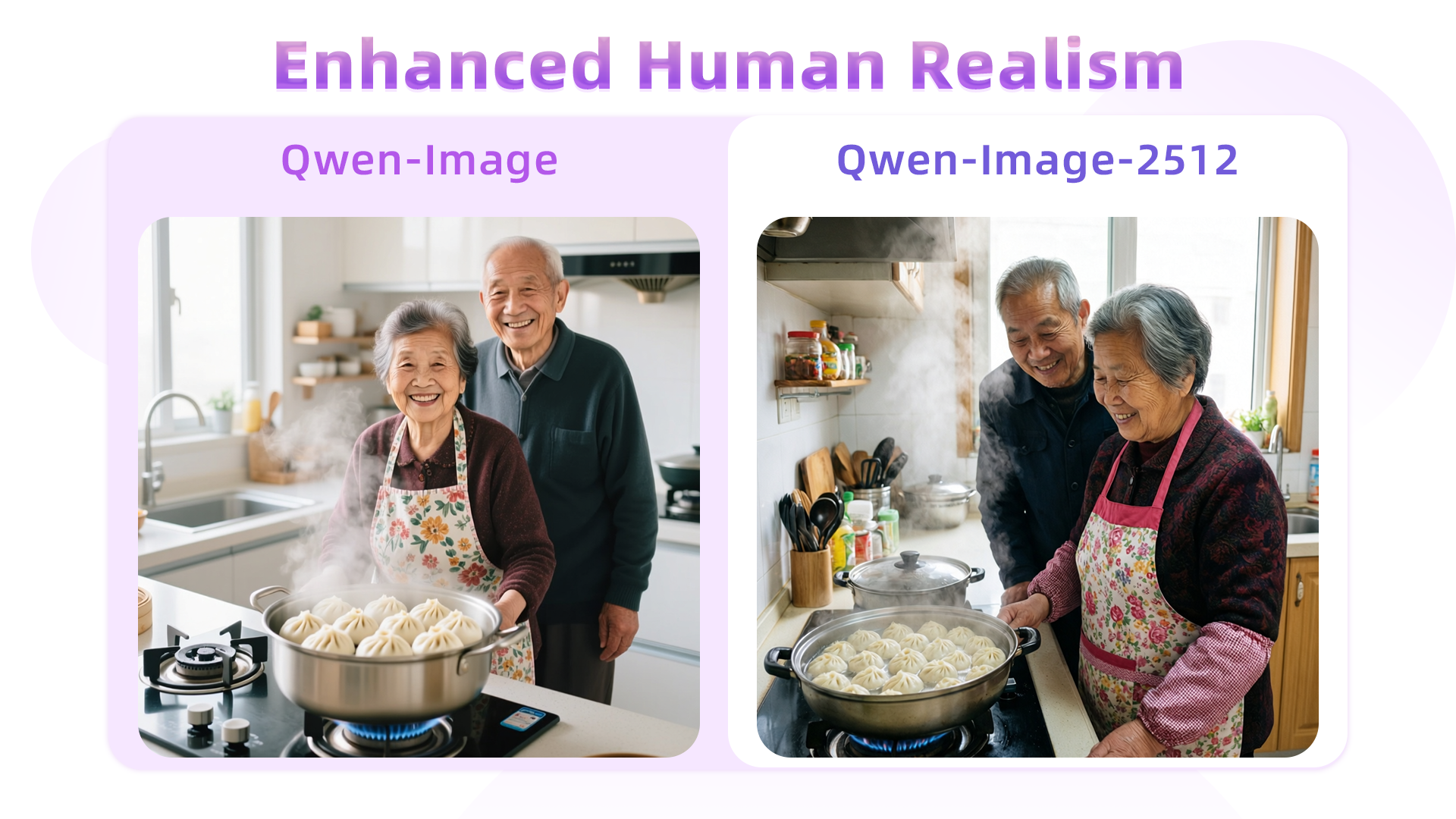 This comparison starkly highlights the gap between the August and December models. The original Qwen-Image struggles to accurately render aged facial features (e.g., wrinkles), resulting in an artificial “AI look.” In contrast, Qwen-Image-2512 precisely captures age cues, dramatically boosting realism. **Finer Natural Detail** Qwen-Image-2512’s enhanced detail rendering extends beyond humans—to landscapes, wildlife, and more. For instance: > A turquoise river winds through a lush canyon. Thick moss and dense ferns blanket the rocky walls; multiple waterfalls cascade from above, enveloped in mist. At noon, sunlight filters through the dense canopy, dappling the river surface with shimmering light. The atmosphere is humid and fresh, pulsing with primal jungle vitality. No humans, text, or artificial traces present. 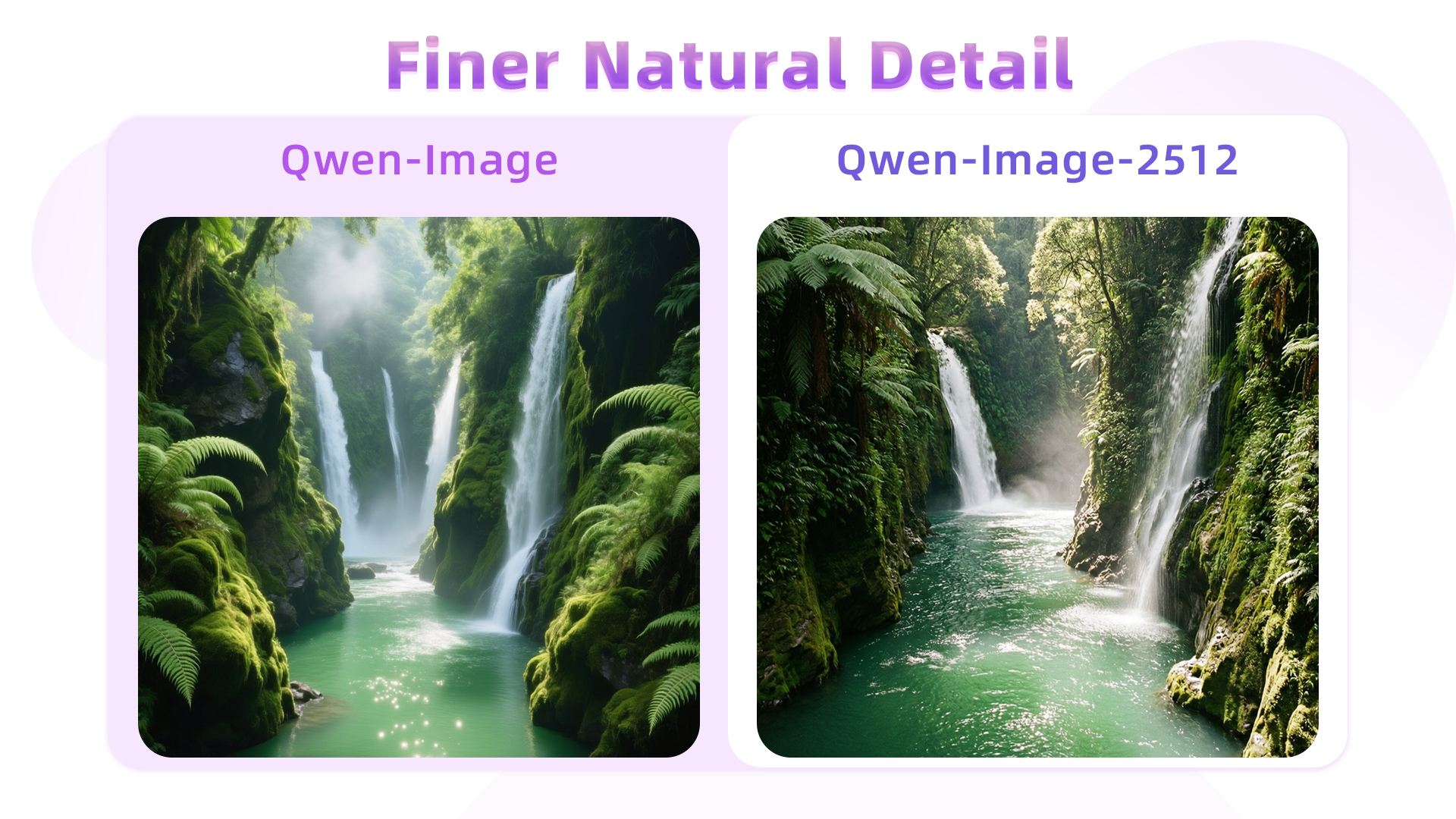 Side-by-side, Qwen-Image-2512 exhibits superior fidelity in water flow, foliage, and waterfall mist—and renders richer gradation in greens. Another example (wave rendering): > At dawn, a thin mist veils the sea. An ancient stone lighthouse stands at the cliff’s edge, its beacon faintly visible through the fog. Black rocks are pounded by waves, sending up bursts of white spray. The sky glows in soft blue-purple hues under cool, hazy light—evoking solitude and solemn grandeur. 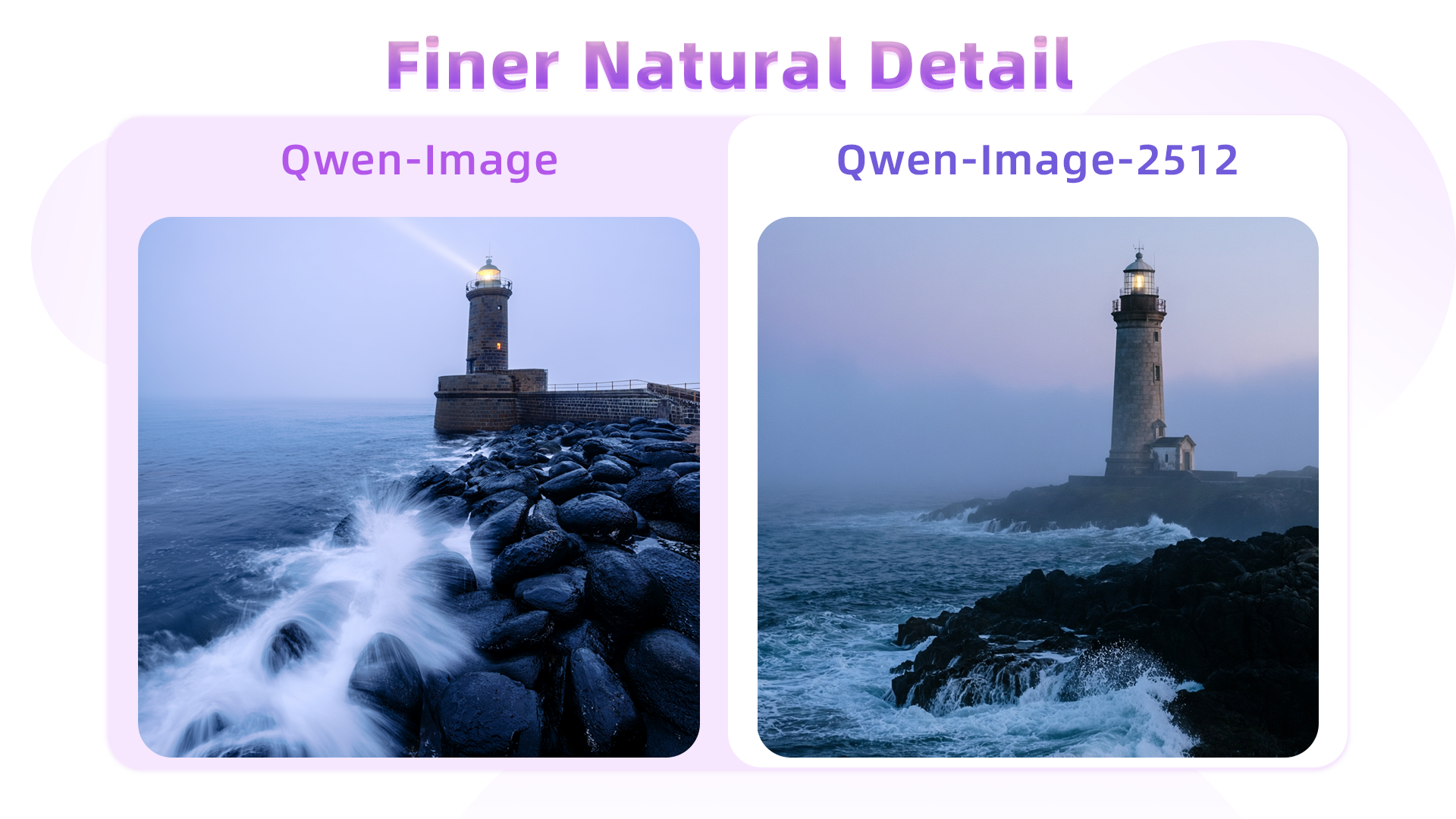 Fur detail is another highlight—here, a golden retriever portrait: > An ultra-realistic close-up of a golden retriever outdoors under soft daylight. Hair is exquisitely detailed: strands distinct, color transitioning naturally from warm gold to light cream, light glinting delicately at the tips; a gentle breeze adds subtle volume. Undercoat is soft and dense; guard hairs are long and well-defined, with visible layering. Eyes are moist, expressive; nose is slightly damp with fine specular highlights. Background is softly blurred to emphasize the dog’s tangible texture and vivid expression. 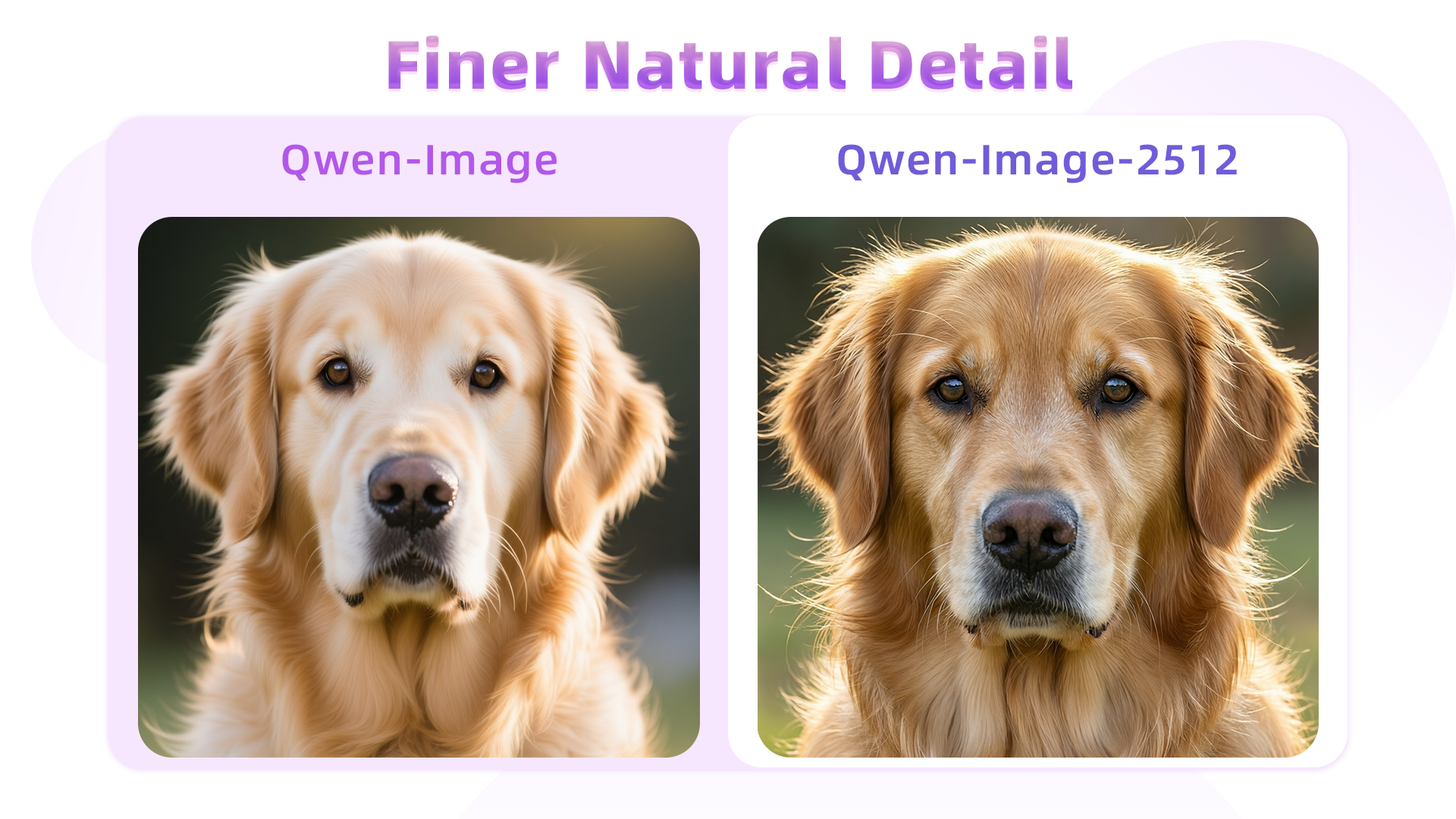 Similarly, texture quality improves in depictions of rugged wildlife—for example, a male argali sheep: > A male argali stands atop a barren, rocky mountainside. Its coarse, dense grey-brown coat covers a powerful, muscular body. Most striking are its massive, thick, outward-spiraling horns—a symbol of wild strength. Its gaze is alert and sharp. The background reveals steep alpine terrain: jagged peaks, sparse low vegetation, and abundant sunlight—conveying the harsh yet majestic wilderness and the animal’s resilient vitality. 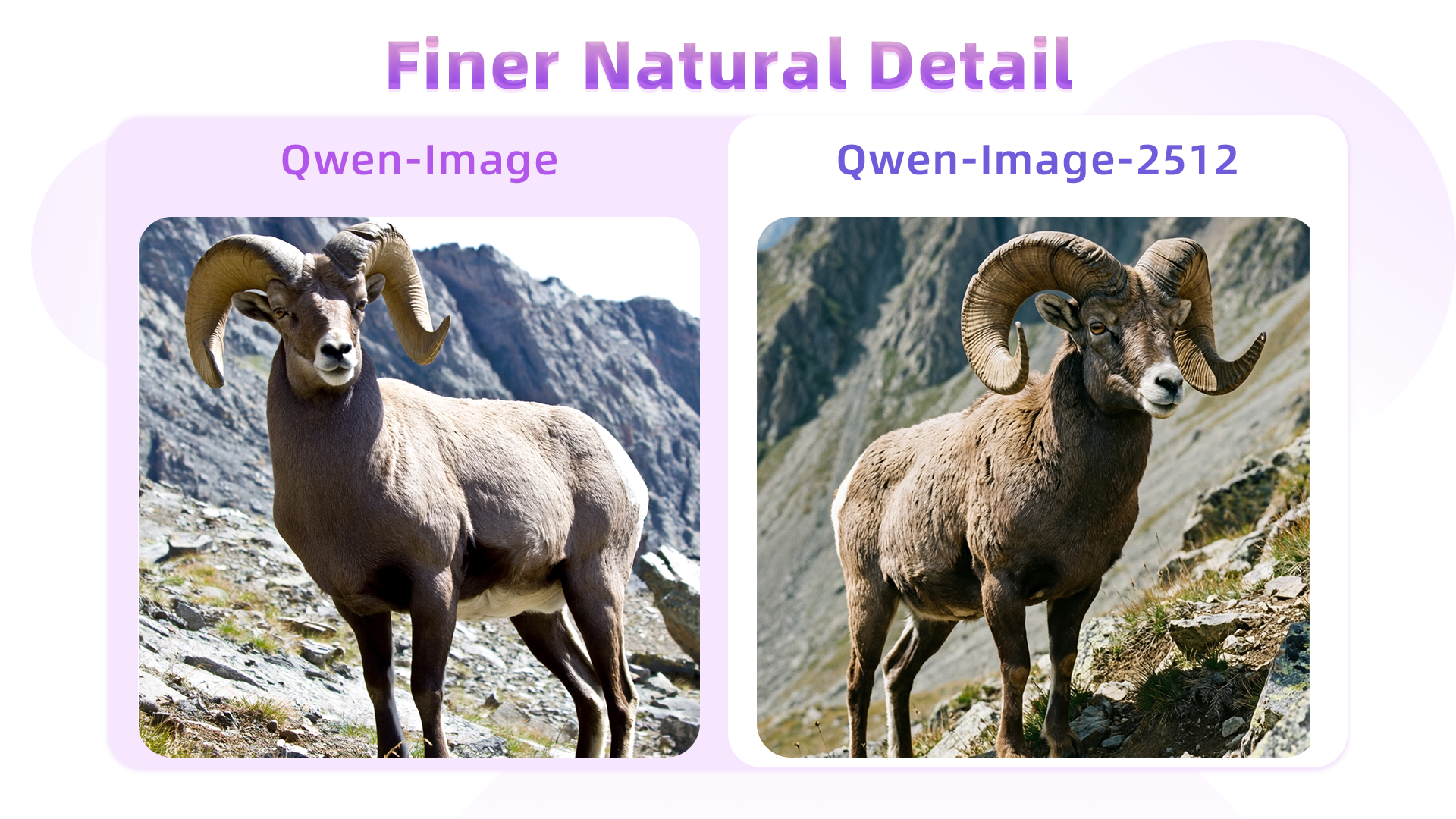 **Improved Text Rendering** Qwen-Image-2512 further elevates text rendering—already a strength of the original—by improving accuracy, layout, and multimodal integration. For instance, this prompt requests a complete PPT slide illustrating Qwen-Image’s development roadmap (generation and editing tracks): > 这是一张现代风格的科技感幻灯片,整体采用深蓝色渐变背景。标题是“Qwen-Image发展历程”。下方一条水平延伸的发光时间轴,轴线中间写着“生图路线”。由左侧淡蓝色渐变为右侧深紫色,并以精致的箭头收尾。时间轴上每个节点通过虚线连接至下方醒目的蓝色圆角矩形日期标签,标签内为清晰白色字体,从左向右依次写着:“2025年5月6日 Qwen-Image 项目启动”“2025年8月4日 Qwen-Image 开源发布”“2025年12月31日 Qwen-Image-2512 开源发布” (周围光晕显著)在下方一条水平延伸的发光时间轴,轴线中间写着“编辑路线”。由左侧淡蓝色渐变为右侧深紫色,并以精致的箭头收尾。时间轴上每个节点通过虚线连接至下方醒目的蓝色圆角矩形日期标签,标签内为清晰白色字体,从左向右依次写着:“2025年8月18日 Qwen-Image-Edit 开源发布”“2025年9月22日 Qwen-Image-Edit-2509 开源发布”“2025年12月19日 Qwen-Image-Layered 开源发布”“2025年12月23日 Qwen-Image-Edit-2511 开源发布” 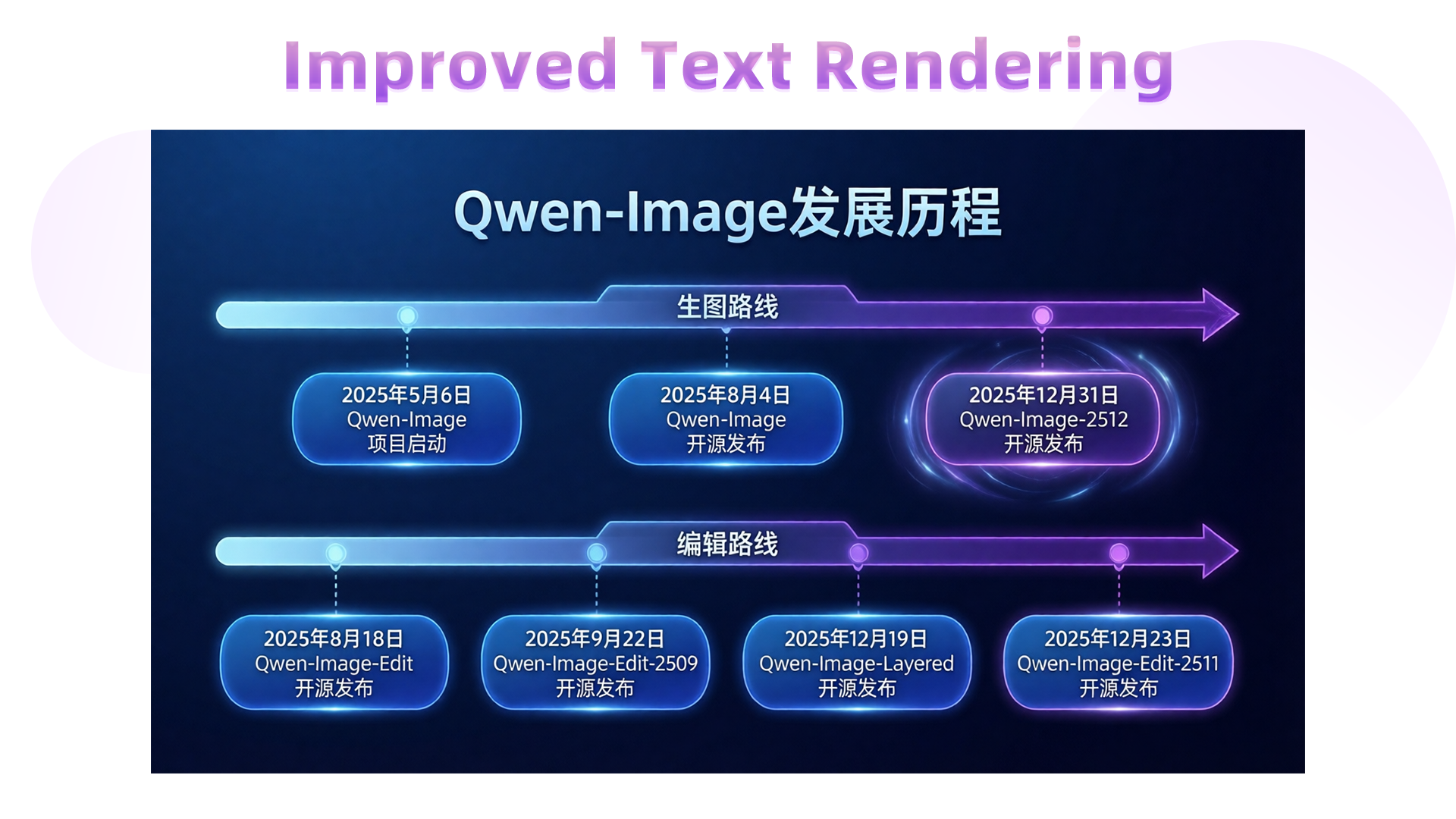 We can even generate a before-and-after comparison slide to highlight the leap from...
