# SeasonOCR SeasonOCR for EasyOCR Models is a .NET OCR library for ONNX models converted from the EasyOCR Python project. The initial public release focuses on a clean CPU-only API: - caller-managed long-lived `InferenceSession` instances - no complex model path binding inside the library - EasyOCR-style box detection, recognition, and paragraph grouping - optional annotated output image and optional debug report 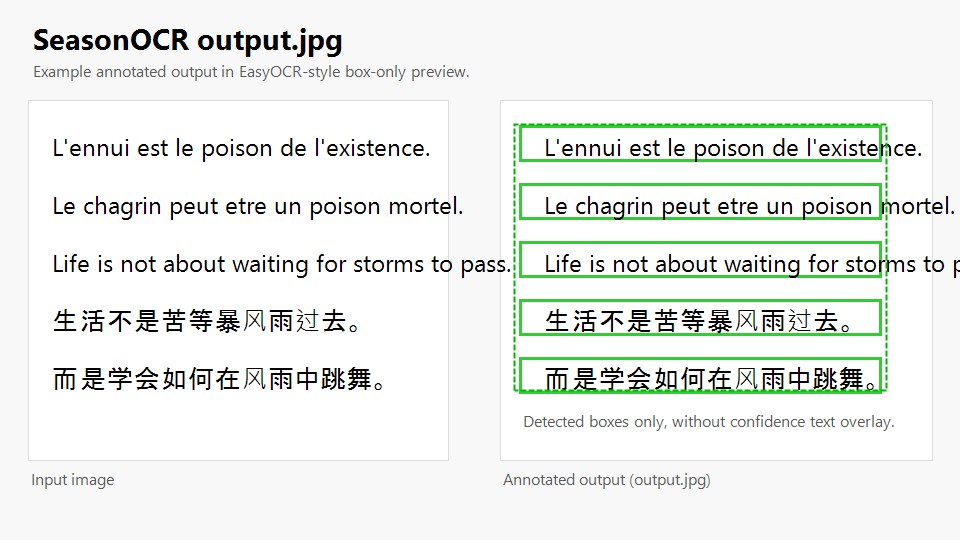 ## Project Links - GitHub: [SeasonRealms/SeasonOCR](https://github.com/SeasonRealms/SeasonOCR) - Models: [SeasonEngine/SeasonOCR on Hugging Face](https://huggingface.co/SeasonEngine/SeasonOCR) - ONNX export workflow: [export-easyocr-onnx.yml](https://github.com/SeasonRealms/SeasonOCR/actions/workflows/export-easyocr-onnx.yml) If you prefer to build the ONNX models yourself, clone the repository and run the workflow logic locally. ## Origin - The OCR pipeline is translated and adapted from [EasyOCR](https://github.com/JaidedAI/EasyOCR). - The intended model inputs are ONNX files converted from EasyOCR Python models. - Files translated from EasyOCR Python sources include source attribution and an explicit modification notice in the file header. ## Features - EasyOCR-style CRAFT post-processing - CRNN / CTC recognition - Beam search by default - Optional dictionary-aware word beam search - Perspective rectification for rotated text regions - Optional rotation TTA, disabled by default - Structured OCR output with boxes, paragraphs, and summary text - Optional JPEG annotated image in box-only preview style - Optional debug report controlled by `SeasonOcr.EnableDebugOutput` - Automatic recognizer language discovery from ONNX metadata - Embedded dictionary loading from recognizer ONNX metadata ## Install ```bash dotnet add package SeasonOCR ``` ## Quick Start ```csharp using System.Text; using Microsoft.ML.OnnxRuntime; using SeasonOCR; using StbImageSharp; SeasonOcr.EnableDebugOutput = true; var detectorBytes = File.ReadAllBytes(@"craft_mlt_25k.onnx"); using var detectorSession = new InferenceSession(detectorBytes); var recognizerBytes = File.ReadAllBytes(@"recognizer_ch_sim.onnx"); using var recognizerSession = new InferenceSession(recognizerBytes); using var stream = File.OpenRead(@"chinese.jpg"); var image = ImageResult.FromStream(stream, ColorComponents.RedGreenBlue); var result = SeasonOcr.Detect( detectorSession, recognizerSession, image, createAnnotatedImage: true); Console.WriteLine(result.Summary); foreach (var paragraph in result.Paragraphs) { Console.WriteLine($"{paragraph.Confidence:P0}: {paragraph.Text}"); } if (result.AnnotatedImage.Length > 0) File.WriteAllBytes(@"output.jpg", result.AnnotatedImage); if (!string.IsNullOrWhiteSpace(result.DebugReport)) File.WriteAllText(@"output.debug.txt", result.DebugReport, Encoding.UTF8); ``` ## Why This API This initial API is intentionally session-based: - You create and reuse `InferenceSession` instances yourself. - The library only consumes the prepared detector session, recognizer session, and decoded image. - This avoids hidden path resolution rules inside the OCR call path. - It also fits engine-style hosts and service applications that want explicit control over model lifetime. For the first release, the recommended runtime target is CPU execution. ## API Notes `SeasonOcr.Detect(...)` current signature: ```csharp public static SeasonOcrResult Detect( InferenceSession detectorSession, InferenceSession recognizerSession, ImageResult imageResult, bool enableWordBeamSearch = false, bool allowRotatedRecognition = false, bool createAnnotatedImage = false, int beamWidth = 5, string? dictionary = null) ``` Parameter behavior: - `enableWordBeamSearch`: enables dictionary-aware decoding when usable dictionary data is available - `allowRotatedRecognition`: enables rotation TTA for recognition; default is `false` - `createAnnotatedImage`: when `true`, `result.AnnotatedImage` contains a JPEG like `output.jpg` - `beamWidth`: beam width used by beam search - `dictionary`: optional in-memory dictionary content; when omitted, embedded model dictionaries are used if present Multilingual support - "en", "recognizer_en.onnx", "English" - "latin", "recognizer_latin.onnx", "Latina" - "zh-CN", "recognizer_ch_sim.onnx", "中文简体" - "zh-TW", "recognizer_ch_tra.onnx", "中文繁體" - "ja", "recognizer_ja.onnx", "日本語" - "ko", "recognizer_ko.onnx", "한국어" - "th", "recognizer_th.onnx", "ไทย" - "ta", "recognizer_ta.onnx", "தமிழ்" - "te", "recognizer_te.onnx", "తెలుగు" - "kn", "recognizer_kn.onnx", "ಕನ್ನಡ" - "ar", "recognizer_ar.onnx", "العربية" - "ru", "recognizer_ru.onnx", "Русский" - "hi", "recognizer_hi.onnx", "हिन्दी" - "bn", "recognizer_bn.onnx", "বাংলা" ## Debug Output Enable debug output before calling the OCR API: ```csharp SeasonOcr.EnableDebugOutput = true; ``` When enabled: - internal debug logging is emitted through `Debug.WriteLine(...)` - `SeasonOcrResult.DebugReport` is populated - per-box debug information can be inspected through `SeasonOcrResult.DebugBoxes` When disabled: - debug logging is skipped - `DebugReport` stays empty unless explicitly produced by the current flow ## Result Contents `SeasonOcrResult` can contain: - `Summary`: human-readable OCR summary - `Boxes`: recognized text boxes kept in the final result - `Paragraphs`: grouped paragraph output - `AnnotatedImage`: JPEG bytes for the box-only preview image - `DebugBoxes`: per-box debug data - `DebugReport`: plain-text debug report suitable for saving as `output.debug.txt` ## Models Recommended model sources: - Download ready-made ONNX models from [Hugging Face](https://huggingface.co/SeasonEngine/SeasonOCR) - Or generate them yourself from the repository workflow: [export-easyocr-onnx.yml](https://github.com/SeasonRealms/SeasonOCR/actions/workflows/export-easyocr-onnx.yml) Recognizer metadata support: - `SeasonOCR` reads embedded recognizer charset metadata when available - `SeasonOCR` reads recognizer `lang_list` metadata when available - Embedded dictionaries such as `dict_ ` are used automatically for word beam search ## Output Image When `createAnnotatedImage` is `true`, the library generates a JPEG preview similar to the official EasyOCR examples: - green detection boxes only - no confidence text overlay - suitable for saving directly as `output.jpg` ## Status Current release scope: - CPU-first - stable public OCR API - session-based integration for application hosts Planned for later: - engine-oriented runtime helpers - GPU provider options - additional provider-specific optimization layers ## License - The project is distributed under Apache License 2.0. - See [LICENSE](LICENSE) and [THIRD_PARTY_NOTICES.md](THIRD_PARTY_NOTICES.md) for attribution and third-party details.
